Colors
Introduction
This guide explains how colors work in the plugin. It covers the fundamentals of color types, how to combine and decompose colors, and the behavior of filtering and reflecting components. The image below illustrates the key concepts:
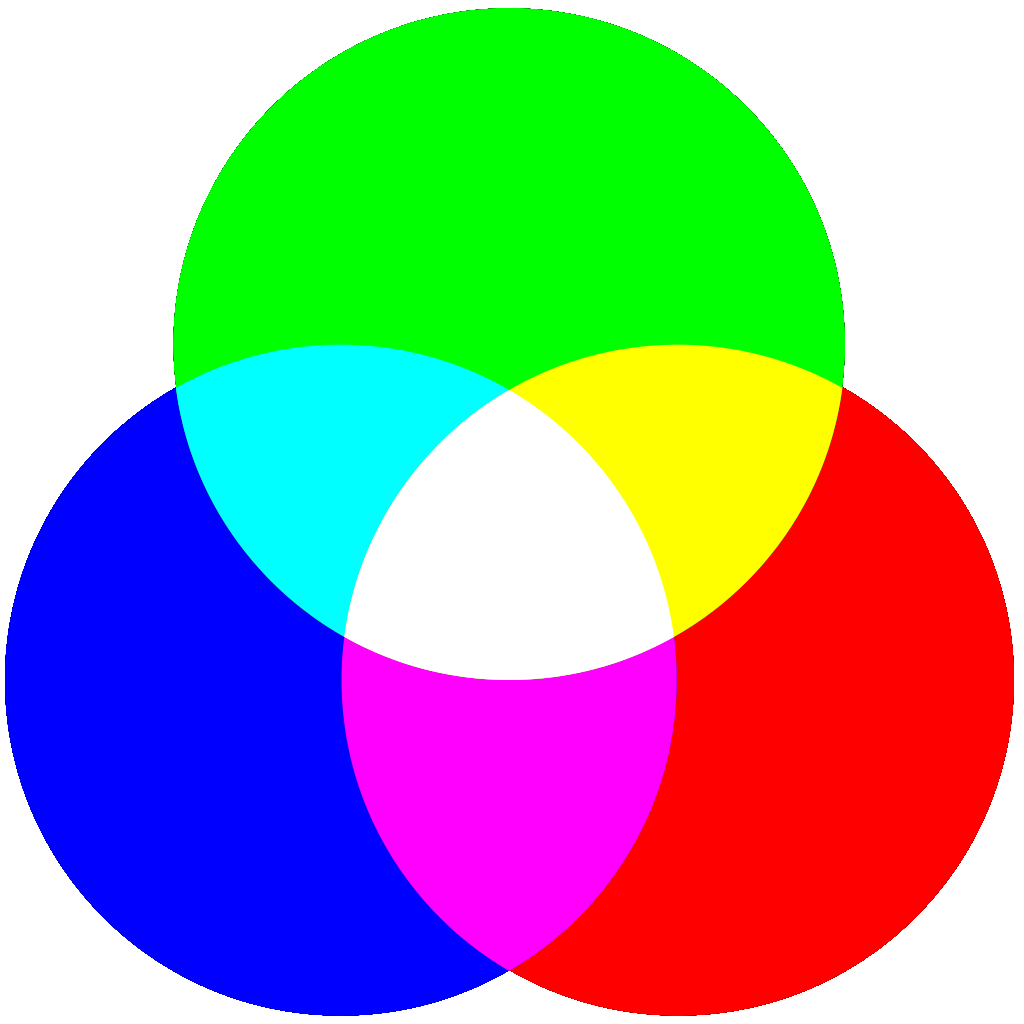
Schema that represents how color addition works.
There are 3 types of colors:
- Primary colors:
 RED
RED GREEN
GREEN BLUE
BLUE
- Secondary colors:
 YELLOW
 MAGENTA
 CYAN
CYAN
 WHITE
WHITE
Colors operations
Colors Addition (Combination)
You can combine multiple colors to form a new one. The components below can add colors and then compare the result to an expected color.
Components Involved
- Laser Receiver: Receives multiple colors, combines them, and activates if the resulting color matches its own.
- Burnable Block: Receives multiple colors and gets destroyed if the result matches its own color.
- Concentrator: Combines incoming colors and then emits the resulting color.
Examples
Normal Examples
-
Combining All Primary Colors:
RED
+ GREEN
+ BLUE
= WHITEExplanation: All three primary colors produce
WHITE. -
Combining Two Primary Colors:
RED
+ GREEN
= YELLOWExplanation: Two primary colors form a secondary color.
-
Primary with Opposite Secondary:
RED
+ CYAN
= WHITEExplanation: Since
CYAN equals GREEN + BLUE, combining it with RED creates WHITE.
Complex Examples
-
Red Added to Magenta:
RED
+ MAGENTA
= MAGENTAExplanation: Since
MAGENTA already contains RED. Adding RED to MAGENTA is useless. -
Combining Magenta and Cyan:
MAGENTA
+ CYAN
= WHITEExplanation: Equivalent to combining
RED + BLUE (from MAGENTA) + BLUE + GREEN (from CYAN)—note that one BLUE is effectively "lost" in the process, resulting in WHITE.
Duplicate Primaries
When a Laser Receiver or a Burnable Block receives the same primary color more than once (e.g. two RED lasers), the duplicate is simply ignored. Only the presence of a primary component matters, not how many times it is received.
Example: A MAGENTA receiver hit by RED + RED + BLUE will activate, because the primary components (red and blue) match.
only_needed_colors Config Option
This configuration option controls how strictly color matching is applied:
true(strict): The received primary components must match exactly the expected ones. No extra, no missing.- A GREEN receiver will activate with a GREEN laser, but not with a WHITE laser (which adds extra red and blue primaries).
- A
false(lenient): The received primary components must contain at least all the expected ones. Extras are tolerated.- A GREEN receiver will activate even with a WHITE laser (since white contains green).
- A
Color Decomposition
Certain colors can be decomposed into their constituent parts. This process works for WHITE and secondary colors.
Components Involved
- Prism: The only component that allows you to break down composite colors into their basic components.
Examples
-
Primary Color:
GREEN remains GREEN since primary colors can't be decomposed. -
Secondary Color:
MAGENTA decomposes into RED + BLUE.Explanation: Secondary colors are decomposed into primary colors.
-
WHITE Decomposition: WHITE decomposes into all primary and secondary colors: RED
+ GREEN
+ BLUE
+ MAGENTA
+ YELLOW
+ CYAN.
Color Filtering
Filter extracts a sub-color from a composite color. The filter lets through lets through only the matching part of the incoming color.
How It Works
A filter passes:
- The exact color of the filter.
- The components that combine to form the filter's color.
Components Involved
- Filtering spheres: Requires a mirror to begin filtering the incoming laser colors.
- Mirror support: Acts as a filter based on the mirror's color and its orientation. (Only when the laser is parallel to the mirror's edge does it filter; otherwise, it reflects.)
- Glass Blocks and Glass Panes: Function as stained glass from Minecraft.
- Mirror blocks: Function as Minecraft concrete powder blocks.
Examples
Normal Examples
-
Matching Filter:
GREEN
/ GREEN
= GREENExplanation:
GREEN filter passes the GREEN laser. -
Non-Matching Filter:
RED
/ GREEN
= NothingExplanation: Since
RED does not contain GREEN, nothing passes. -
Secondary Color Filtering:
YELLOW
/ GREEN
= GREENExplanation:
YELLOW contains both GREEN and RED. A GREEN filter lets only the GREEN part of the given YELLOW color pass through. -
Filtering White:
WHITE
/ GREEN
= GREENExplanation:
WHITE contains all primary colors, so the GREEN filter passes only the GREEN part.
Complex Example
-
Complet Filtering with Incompatible Colors:
CYAN
/ YELLOW
= GREENExplanation: The given
CYAN color contains BLUE and GREEN. A YELLOW filter lets pass YELLOW, GREEN, and RED. This is why only the GREEN part of the given color will pass through a YELLOW filter.
Filtering Reflection
Mirror support can exhibit a mix of filtering and reflection, depending on how the laser interacts with the mirror.
Behavior Overview
-
Edge Filtering: As explained in the filtering chapter above, a mirror can behave like a filter: This filtering behavior will occur if the laser passes through the edge of the mirror. In other words, the laser must be parallel to the mirror for the mirror support to behave like a filter.
-
Face Reflection with Filtering: On the contrary, if the laser touches one side of the mirror (and therefore doesn't pass its edge), the behavior will be a mixture of filtering and reflection. It is this particular behavior that is explained in this chapter.
In this case, the mirror filters the colors and then reflects the remaining colors. The colors subtracted during filtering pass through the mirror.
Components involved
- Mirror support: Must contain a coloured mirror. The laser must hit a face of the mirror (not its edge—otherwise it will act like a filter) to trigger this mixed behavior.
Examples
Normal Examples
-
Matching Reflection:
GREEN
| GREEN
= GREEN is reflected and NOTHING pass throughExplanation: A
GREEN mirror receiving a GREEN laser will reflect GREEN and nothing will pass through._ -
Partial Reflection:
YELLOW
| GREEN
= GREEN
\is reflected and RED passes through.Explanation:
YELLOW contains RED and GREEN. The GREEN part is reflected by the GREEN mirror, while the remaining RED passes through. -
White with Reflection:
WHITE
| GREEN
= GREEN
\is reflected and the combined RED + BLUE (i.e. MAGENTA) passes through.Explanation:
WHITE contains every primary colors. A GREEN mirror reflects the GREEN part of the given WHITE color. The remaining color, RED + BLUE, which is equivalent to MAGENTA, will pass through. -
Using a YELLOW Mirror:
WHITE
| YELLOW
= YELLOW
\is reflected and BLUE passes throughExplanation:
WHITE every primary colors. A YELLOW mirror reflects the YELLOW part of the given WHITE color. The remaining BLUE color will pass through.
Complex Examples
-
No Filtering Reflection:
RED
| GREEN
= Nothing is reflected and RED pass through.Explanation: Since
RED does not contain any GREEN component, nothing is filtered and thus nothing is reflected._ -
Combined Complex Behavior:
CYAN
| YELLOW
= GREEN is reflected and BLUE passes through.Explanation:
CYAN ( BLUE + GREEN) meets a YELLOW filter ( GREEN + RED). Only the overlapping GREEN is reflected; the remaining BLUE is allowed to pass.
Laser Duplication
Mirror Support with a black mirror demonstrate a unique behavior: they duplicate the laser when the laser touches a face of the mirror (according to their orientation).
Behavior Overview
- Edge Behavior: As explained in the filtering chapter above, a mirror can behave like a filter: When a laser passes through the edge of a black mirror, it acts as a filter (identical to a white mirror's filtering behavior).
- Face Behavior (Duplication): When the laser touches one face of a black mirror (and therefore does not pass its edge), it is both reflected and allowed to pass through. This duplication can be used to create new laser sources by setting up mirrors facing each other. This allows a higher level of complexity in puzzle creation. For further details, refer to the complex example.
Components Involved
- Mirror support: Must contain a black mirror. The laser must contact a face rather than the edge to enable duplication (if its touch its edge, it will act like a filter).
Examples
Normal Example
-
Laser Duplication with Black Mirror:
GREEN
<> BLACK
= GREEN
+ GREENExplanation: the
GREEN is both reflected and transmitted.
Complex Example
- Create a new Laser Source:
- Place one Mirror Support with a black mirror and another with a white mirror.
- Position the two mirrors so that they face each other.
- Send a laser to the black mirror.
- After stopping the initial laser, the light will loop between the black and white mirrors, effectively creating a new light source.